
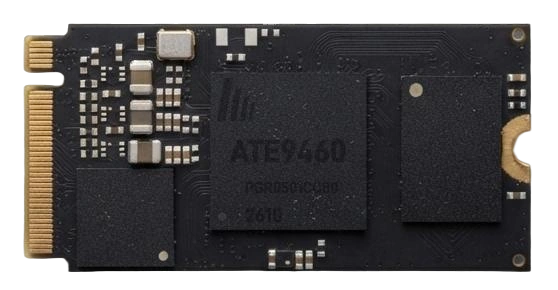
Highlights
Specifications
| Part Number | ATE9460 |
| Role | TX Transmitter |
| HDMI Direction | Input |
| Max Resolution | 3840×2160 @ 60Hz |
| Max Frame Rate | 1080p @ 240Hz |
| Link Rate | VHT40 (802.11ac) |
| Link Encryption | End-to-end encrypted (video, audio, KVM data) with a key created at pairing |
| HDMI Loop-out | No loop-out on the module itself; add an HDMI splitter chip on the carrier board for 4K60 loop-out |
| Wired Ethernet | 100M Ethernet PHY on module; differential pairs on the edge connector, add magnetics and RJ45 on the carrier board |
| Package | 80-pin edge connector |
| Dimensions | 22 × 45 mm |
| Supply | VBUS 3.7 ~ 5.1 V |
| Current | 500 ~ 800 mA |
| Connector ID | ATE9460-S |
| Pairs With | ATE9461 |
Overview
ATE9460 is a 4K60 wireless video transmitter on a 22 × 45 mm board with an 80-pin edge connector. It plugs into your own carrier board: the HDMI connector on the carrier brings in the source, the module encodes it in H.265 and sends it over 5 GHz to the paired ATE9461. The same stream can also leave through the built-in 100 Mbps Ethernet port, across a switch, a router or a fiber converter.
The receiver reads the display EDID and sends it back. ATE9460 hands it to the source, so laptops, cameras and players output what the screen really supports, with no resolution setting on site. Keyboards, mice and touch screens on the receiver side travel back over the reverse channel to the host, which is how wireless KVM works.
The whole video link is encrypted. TX and RX create their own key at pairing, and video, audio and keyboard/mouse data are encrypted all the way. Devices that are not paired cannot join or decode the picture, which suits meeting rooms, hospitals and factories that do not want video leaking out.
The module has no HDMI loop-out of its own. Add an HDMI splitter chip on the carrier board and you get a 4K60 loop-out for a local monitor.
Typical Applications
Signal Chain
Video goes from transmitter to receiver; EDID and keyboard/mouse data travel back to the host. Wireless and wired links use the same pair of modules.
- SourceHDMI
- ATE9460 · Transmitter
- 5 GHz wireless, or Ethernet / fiber
- ATE9461 · Receiver
- Display + keyboardHDMI · USB
4K30 or 4K60
The two series differ in resolution and in how the transmitter provides loop-out.
Apart from resolution and loop-out, the two series share the same size, wireless and Ethernet, link encryption, EDID and KVM behaviour. Their pinouts differ, though, so carriers are not interchangeable and the series do not cross-pair. Loop-out only concerns the transmitter; receivers drive HDMI directly.
ATE9460 Detailed Specifications
Video & Audio
| HDMI direction | Input (source to module) through the HDMI connector on the carrier |
|---|---|
| Interface | HDMI 2.0b (TMDS) |
| Max resolution | 3840 × 2160 @ 60Hz, 4:4:4 / 8-bit (TMDS 594 MHz) |
| High frame rate | 1080p @ 240 / 165 / 144 / 120Hz |
| Other timings | 3840×2160@30/25/24, 2560×1440@60, 1920×1080@60/50/30, 1600×1200@60, 1280×720@60/50, 720×576@50, 720×480@60 |
| Color space | RGB 4:4:4, YCbCr 4:4:4 / 4:2:2 / 4:2:0, auto-detected |
| Color depth | 8-bit / 10-bit (10-bit up to 4K30) |
| HDR | HDR10 static metadata and HLG passed through |
| HDMI audio | LPCM 2.0 / 5.1 / 7.1 passed through; Dolby Digital and DTS bitstreams passed through |
| Encoding | H.265, bitrate adapts to the channel, up to 60 Mbps |
| I²S audio | MCLK / SDIO / LRCK / SDO / SCK on the edge connector |
| HDMI loop-out | Not on the module; add an HDMI splitter chip on the carrier for 4K60 loop-out |
| End-to-end latency | About 100 ms at 4K60; about 33 ms at 1080p 240 / 120Hz |
EDID & HDCP
| EDID | The receiver reads the display EDID and sends it back; the transmitter presents it to the source |
|---|---|
| Fallback EDID | Built-in default EDID while the link is down, so the source always outputs |
| HDCP | HDCP 2.3 / 1.4, falls back to 1.4 when the display only supports 1.4; the end-product maker needs its own HDCP license |
| Hot-plug | HPD state synced in real time |
Wireless Link
| Band | 5.15 – 5.85 GHz, channels limited by sales region |
|---|---|
| Link rate | VHT40 (802.11ac, 40 MHz) |
| Encryption | Encrypted end to end, covering video, audio and KVM data; key created at pairing; applies to both wired and wireless links |
| Modulation | OFDM, BPSK to 256-QAM, adaptive |
| Range options | AIC8800-D40: 30-100 m; AIC8800-D80: 100-300 m; RTL8812CU: 300-1000 m (line-of-sight figures) |
| Antennas | D40 / D80: one antenna (1T1R); 8812CU: two antennas (2T2R); 4T4R on request |
| Channel selection | Scans and picks the best channel at power-up, can switch while running |
| One-to-many | One TX can broadcast to several RX units |
Wired Link
| Ethernet | Built-in 100 Mbps Ethernet PHY; ERXN / ERXP / ETXN / ETXP on pins 3 / 5 / 7 / 9 |
|---|---|
| Carrier needs | Magnetics + RJ45 |
| Distance | About 500 m through switches or routers; 10 km and 20 km+ with fiber converters |
| KVM | KVM data runs over both the wired and the wireless link |
Power & Electrical
| Supply | VBUS 3.7-5.1 V, typ. 5.0 V; above 5.1 V damages the module |
|---|---|
| Operating current | 500-800 mA (4K60 streaming) |
| Power | 2.5-3.8 W (VBUS 5.0 V) |
| Logic levels | I²C / I²S 3.3 V LVCMOS; KEY 1.8 V with 10 kΩ pull-up |
| Ripple | ≤ 50 mVpp (10 Hz – 20 MHz) |
| VBUS pins | Pins 53 / 55 / 57, all connected together |
| TMDS | 100 Ω differential, HDMI 2.0b electrical |
Pairing & Control
| Pairing | Shipped pre-paired and links at power-up; hold KEY 5 s to re-pair on site |
|---|---|
| Keys | KEY0 (pin 12) pairing, active low; KEY1 (pin 14) reserved |
| Spare IO | Even pins 18-42, plus 56 and 58; leave open if unused |
Mechanical
| Package | 80-pin edge connector, 0.5 mm pitch |
|---|---|
| Size | 22.0 × 45.0 mm, ±0.15 mm |
| PCB thickness | 0.80 ± 0.07 mm |
| Component height | Top side up to 1.1 mm, bottom side up to 2.1 mm |
| Mounting | M2 screw hole at the far end (2.2 mm) |
| Connector marking | ATE9460-S |
| Paired with | ATE9461 |
Environment & Compliance
| Operating temp. | −20 to +70 °C (ambient at module surface) |
|---|---|
| Storage temp. | −40 to +85 °C |
| Humidity | 10% to 90% RH, non-condensing |
| ESD | ±8 kV contact, ±15 kV air (IEC 61000-4-2) |
| Vibration / shock | 10-500 Hz 1.5 Grms (IEC 60068-2-6); 50 G 11 ms (IEC 60068-2-27) |
| MTBF | ≥ 60,000 h @ 25 °C (Telcordia SR-332) |
| Certification | SRRC, FCC / ISED, CE RED, TELEC, KC; regulatory settings are flashed per sales region, so state the region when ordering; RoHS / REACH |
| Assembly | Plug-in module, do not reflow; MSL 3 moisture-barrier packing |
Dimensions
Carrier Board Design Notes
- Keep VBUS between 3.7 and 5.1 V. Step 12 V, 24 V or USB-C high-voltage input down with a DC-DC converter rated at least 1 A per module. Tie pins 53 / 55 / 57 together and place 22 μF + 100 nF right at the edge connector.
- Route the four TMDS pairs at 100 Ω differential, intra-pair skew under 5 mil and inter-pair under 20 mil, with no layer changes or split crossings. Keep 3W spacing from key, LED and I²S traces.
- For a local monitor, put an HDMI splitter chip between the input connector and the module: one output feeds ATE9460, the other goes to the loop-out connector at 4K60.
- For a wired link, connect ERXN / ERXP / ETXN / ETXP (pins 3 / 5 / 7 / 9) to magnetics and an RJ45. For fiber, add a 100 Mbps media converter on the Ethernet port.
- If you plan on RTL8812CU for long range, leave room for two antennas on the carrier. D40 and D80 need one.
- ATE9460 and ATE9461 have different pinouts, so the TX and RX carriers are separate designs. They also cannot share a carrier with the 4K30 ATE9430T / ATE9430R.
- Leave all N and NC pins open, neither grounded nor pulled up. No test points in the edge-connector area. Connect every G / GND / NG pin to the ground plane.
- The module runs warm. Leave airflow or a thermal pad over it in the enclosure.
FAQ
Q1Can the ATE9460 4K60 wireless HDMI transmitter do HDMI loop-out?
Q2What latency and bitrate does ATE9460 achieve?
Q3How far does the 4K60 wireless video module reach?
Q4Is the link encrypted? Can the video be intercepted?
Q5Does ATE9460 support HDCP 2.3 and EDID pass-through?
Q6Can ATE9460 work with ATE9430R or share its carrier board?
Q7Can you build wireless presentation or wireless KVM products OEM / PCBA with ATE9460?
Pairing & Indication
| Action | LED | Result |
|---|---|---|
| Hold KEY 5s | Fast blink | Enters pairing mode and searches for the peer |
| Paired | Solid on | Link up and streaming; the RX overlays an OSD with pairing and key info |
| Hold KEY 25s+ | Slow blink | Factory reset: clears SSID, key and pairing — re-pairing required |
Get the Full Datasheet
Includes the 80-pin assignment, electrical parameters, mechanical drawings and carrier-board guidelines.
Contact UsPairs With & Related
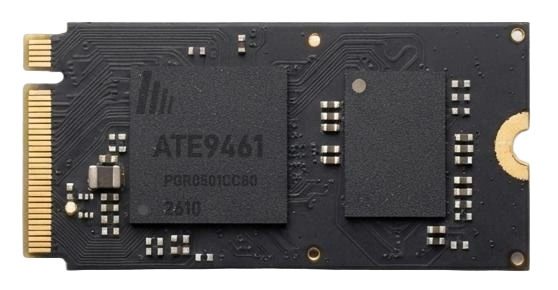
ATE9461 Wireless Video Receiver
Receive, decode, HDMI out. Audio DAC and I²C, with OSD overlay on successful pairing.
View specs →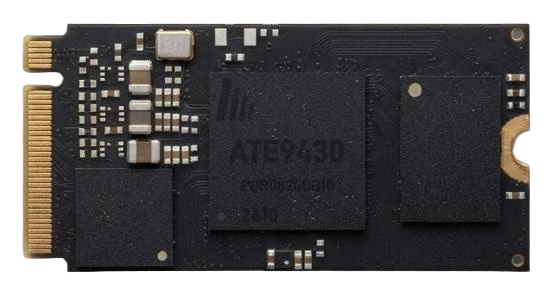
ATE9430T Wireless Video Transmitter with HDMI Loop-out
HDMI in, encode, transmit at up to 4K30. Built-in HDMI loop-out at 4K30 feeds a local monitor without an external splitter.
View specs →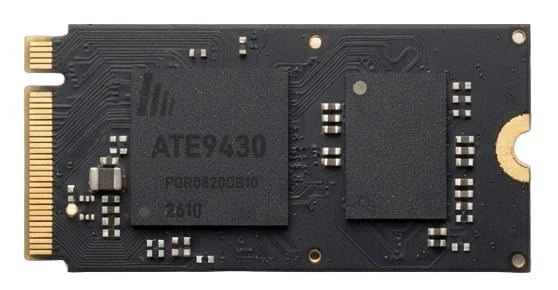
ATE9430R Wireless Video Receiver Module
Receive, decode and output HDMI at up to 4K30, or up to 120Hz at 1080p.
View specs →